


_a_change_the__2026__to.jpg)


1. Introduction: The AI Mobile App Development Revolution
In today's highly competitive app market, artificial intelligence is rapidly evolving from a premium feature into a standard expectation. By 2026, users won't simply appreciate AI-powered experiences—they will expect them in the apps they use every day.
This shift presents both an opportunity and a challenge for businesses and developers. Those who embrace AI early can deliver smarter, more personalized experiences, while those who lag behind risk falling short of rising user expectations. For FlutterFlow developers, this creates an exciting opportunity to leverage visual development and AI integrations to build the next generation of intelligent applications.

In this article, we'll explore five AI capabilities that are expected to become standard features in mobile applications by 2026 and discuss how FlutterFlow developers can implement them effectively. Whether you're a startup founder building the next generation of apps or a developer looking to expand your FlutterFlow expertise, these insights will help you create intelligent, future-ready applications that remain competitive in the years ahead.
1. Intelligent Personalization Systems
How Personalization Will Define the User Experience by 2026

The era of mobile applications created for everyone is gone. Several market studies have concluded that apps that provide personalized experiences produce customer retention rates that are 38% higher than apps that create generic experiences, and 25% higher revenue. By 2026, every user will expect their app to understand their preferences and needs, and respond to those preferences accordingly.
When we talk about personalized experiences, we are talking about more than just inserting a user's personal name. Advanced AI personalization systems will be able to analyze a user's behavior, including their interaction history, and their data to create meaningful personalized interactions. From a business perspective, providing a more personal and satisfying experience to users will provide a huge competitive advantage using personalization systems in FlutterFlow that would otherwise be commonplace in a few years.
Incorporating AI Personalization into FlutterFlow
There are a number of ways to create personalization features in FlutterFlow without extensive coding experience. The best implementation of AI personalization is through utilizing FlutterFlow's native features as well as planned integrations to external AI services to power personalization.
You should first build out a comprehensive user profile using FlutterFlow with the Firestore database. As you design your database it will be helpful to formulate a design that will store user preferences, behavior patterns, and interaction history. All of this is needed to make personalization meaningful.
You will want to incorporate the personalization logic using a combination of FlutterFlow's built-in conditional visibility features and custom functions. You should consider being able to utilize dynamic content blocks; dynamic content blocks could be user segments that personalize the content based upon a user's preferences. For more sophisticated advanced personalization, you could integrate with services like Firebase Remote Config and control personalization settings on the server side.
The real magic happens when you connect your FlutterFlow app directly to specific personalization APIs. Many services, such as Google's Recommendations AI can be integrated directly through FlutterFlow's HTTP API actions. These services have access to advanced recommendation algorithms that would be difficult to develop from scratch, and you will have to refer to developer documentation to understand how to integrate them properly.
When you implement a personalization system in your app it is essential that you test it to optimize for effectiveness. Use the preview function in FlutterFlow to experience the personalization as if you are from different user perspectives. You will also want to implement analytics tracking to learn about the effect of personalization on your app's key metrics of engagement time, conversion rate, and user retention.
2. Generative AI Integration with Leading Models
How ChatGPT, Gemini, and Claude Are Changing Mobile Apps
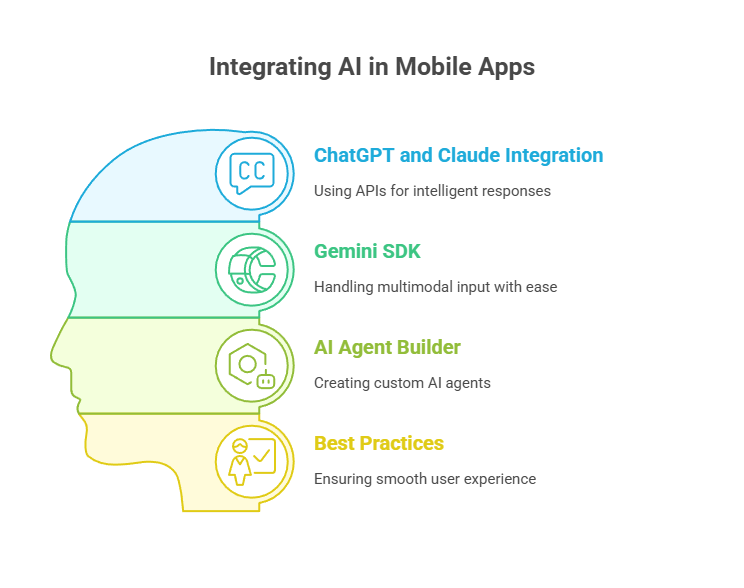
By 2026, the integration of generative artificial intelligence models such as OpenAI's ChatGPT, Google's Gemini, and Anthropic's Claude will clearly be a major standard in intelligent mobile applications. These large language models (LLMs) are prominently changing how we conceive of content creation, problem-solving execution, and user interaction in apps.
The capabilities of these models with respect to mobile applications are truly game-changing: delivering personalized content on demand, creating nuanced and complex responses to queries, generating images and designs based upon textual input, solving multi-step problems, and adapting communication styles to align with user preferences.
The early evidence from those pioneers already implementing this technology gives instant insights: 53% increase in engagement time, 41% increase in task completion rates, and 37% increase in satisfaction scores compared to apps without generative AI features. Clearly, by 2026, users will expect this.
How to Add Generative AI to Your FlutterFlow App (In Simple Terms)
FlutterFlow has made it much easier to build smart apps by adding support for powerful AI features. Even if you're not a technical expert, you can now connect your app to advanced AI models like ChatGPT, Claude, and Gemini. FlutterFlow lets you do this using simple tools like HTTP API calls, the Gemini SDK, and a new AI Agent Builder. Here's how each one works and how you can use them in your app.
1. Connecting ChatGPT and Claude Using API
If you want to make your app respond intelligently to users (like answering questions or giving suggestions), you can use OpenAI's ChatGPT or Anthropic's Claude. These are both powerful AI tools, and you can connect them to your FlutterFlow app using HTTP API calls.
To do this, you first get an API key from OpenAI or Anthropic. Then, inside FlutterFlow, you use the API Call feature to send a request to their servers with the user's message. The AI will respond with a smart answer, which you can show in your app.
You can also control how the AI behaves by adjusting settings like:
- Temperature – How creative the AI's response is
- Max Tokens – How long the response can be
- System Message – Tells the AI what role it should play (like a teacher, doctor, or travel agent)
To make the AI remember previous chats, you can store part of the conversation in Firestore, which connects easily to FlutterFlow.
Example Use Cases:
- An AI tutor answering student questions
- A fitness coach giving advice
- A customer support bot in an e-commerce app
2. Using Gemini with Built-in SDK
FlutterFlow now has a built-in Gemini SDK, which means you don't need to do any extra coding or setup to use Google's Gemini AI model. This makes it very easy to use.
The special thing about Gemini is that it can handle multimodal input — this means it can understand both text and images. For example, a user could upload a photo of a product or a plant and then ask a question about it. Gemini will analyze the image and give a helpful response.
Example Use Cases:
- In a shopping app, users can ask questions about a product by uploading its photo
- In a farming app, users can upload a picture of a leaf and ask if the plant is healthy
We have also built a multilingual AI farming app called FarmGPT using FlutterFlow. This app helps farmers ask questions about plants, animals, or diseases in multiple languages, and get instant advice. It uses AI to scan images, answer questions, and even give suggestions on how to treat crop issues. FarmGPT was selected as a winning entry in the FlutterFlow AI Hackathon 2024, and shows what's possible when AI and FlutterFlow are combined smartly.
Best Practices to Keep in Mind
When using AI in your app, it's important to give users a smooth experience. Here are a few tips:
- Show a loading screen while the AI is thinking or processing the answer
- Handle errors properly. If the API fails or times out, show a simple error message to the user
- Cache common questions and answers, so you don't send too many API requests. This saves cost and speeds up your app
- Be careful with user data. Don't send private information to AI services without clear user consent
Thanks to FlutterFlow's updates, adding AI to your app is now simple and powerful. Whether you want to build a chatbot, use image analysis, or create a personal assistant, you have all the tools you need — even if you're not an expert developer.
The combination of HTTP API calls, the Gemini SDK, and the AI Agent Builder gives you many ways to create smart, helpful, and engaging apps for real-world use. If you're building in FlutterFlow, now is the perfect time to start adding AI features to make your app stand out.
3. AI Agents: Creating Task-specific Assistants with FlutterFlow

Why AI Agents Will Transform Apps by 2026
By 2026, AI agents—specialized AIs that perform specific tasks autonomously—will be standard elements in advanced mobile apps. These agents are more than chatbots - they're capable assistants that can perform a series of actions for the user.
The business impact of effective AI agents is impressive. Apps with effective AI agents have 43% less time taken for user tasks, 38% fewer requests for customer support, and 29% higher ratings from user satisfaction surveys. This will directly lead to higher retention rates and lower operational costs.
With the advent of AI agent capabilities that FlutterFlow recently launched, this technology is accessible to Flutter developers. Now the playing field has opened for businesses so any company can now deploy sophisticated autonomous capabilities that previously required substantial resources and expertise.
Building Effective AI Agents with FlutterFlow's New Capabilities
Being able to define the tasks associated with AI agent development using FlutterFlow tools means you will start with the right steps to develop your task-specific intelligent assistant in your business applications. FlutterFlow's tools will easily allow you to define agent abilities and components, connect to required data sources and apply task-specific logic without extensive coding.
You should start with the basics of defining what the AI agent should do - and consider the scope of the agent. All successful AI agents operate in specific areas, rather than trying to be all things to all users. For example, you might want to create a booking agent (to schedule appointments), a support agent (to see if a common issue can be troubleshot), or a shopping agent (to help a user find and purchase available products). Using FlutterFlow's agent builder, you will define the tools your agent will use. These might include database queries, API calls, math functions, or other custom functions. Once you have defined the tools, you will be creating the building blocks your agent will use to perform its tasks.
Next, implement your agent's knowledge, using FlutterFlow's vector database. The knowledge, or knowledge base for your agent, is the information you will use to provide answers or take action to respond to users' questions or tasks. You will populate this database with all information that is relevant to your agent, which might be about your products, services, policies or any other domain knowledge to adhere to.
At the very core of agent development is creating the action flow - the journey or series of steps your agent will take to complete a user's task. The visual editor in FlutterFlow allows you to build your action flows conveniently, without having to write code and form links between the user inputs and expected responses or follow through with taking action or giving an appropriate response. As you author these interactions, you will be building flow diagrams, or decision trees, where your agent takes different actions based on user inputs.
Testing is a critical aspect of effective agent development. Use the testing tools in FlutterFlow to simulate conversations and requests, and identify edge cases and failure points. You should also use logging to keep track of how your agent is performing - including what users might think or how satisfied they are - and create a feedback loop for continuous improvement.
If you are developing a 'power' agent you should also implement handoff protocols that facilitate the transition between using an agent and human assistance. Any situation that is beyond the agent's capabilities can lead to user frustration and sometimes dissatisfaction when they may perceive that the agent is not capable or supportive. It is worth building a system for your agent to be able to route or complete the majority of your basic requests easily.
4. Visual Intelligence and AR
How Visual AI Will Change Mobile Apps by 2026

By 2026, visual intelligence features such as image recognition, object detection, and augmented reality (AR) are expected to become standard across mobile applications. These technologies are transforming how users interact with apps by seamlessly connecting digital experiences with the physical world.
The business impact of visual AI is already significant. Retail apps with virtual try-on experiences have reported conversion rate increases of up to 40%, while real estate platforms using AR visualization have seen engagement times increase by more than 3x. As these capabilities mature, they will evolve from differentiating features into essential components of competitive mobile experiences.
Implementing Visual Intelligence in FlutterFlow
FlutterFlow enables developers to integrate visual AI through APIs and third-party services. Platforms such as Google Cloud Vision and Azure Computer Vision can be connected via APIs to enable features like image recognition, text extraction (OCR), face detection, content moderation, and automatic image tagging.
For AR experiences, developers can leverage custom code, WebXR integrations, or native AR frameworks to create product previews, spatial mapping experiences, and interactive visual guides.
Designing for Better User Experience
Visual intelligence features often require camera access and background processing. Developers should design intuitive permission flows, provide loading indicators, and offer real-time feedback to ensure a smooth user experience. FlutterFlow's state management capabilities make it easier to manage these interactions while keeping the interface responsive and user-friendly.
As visual AI continues to evolve, FlutterFlow provides developers with the flexibility to build immersive, intelligent experiences that will define the next generation of mobile applications.
5. AI-Powered Security and Authentication
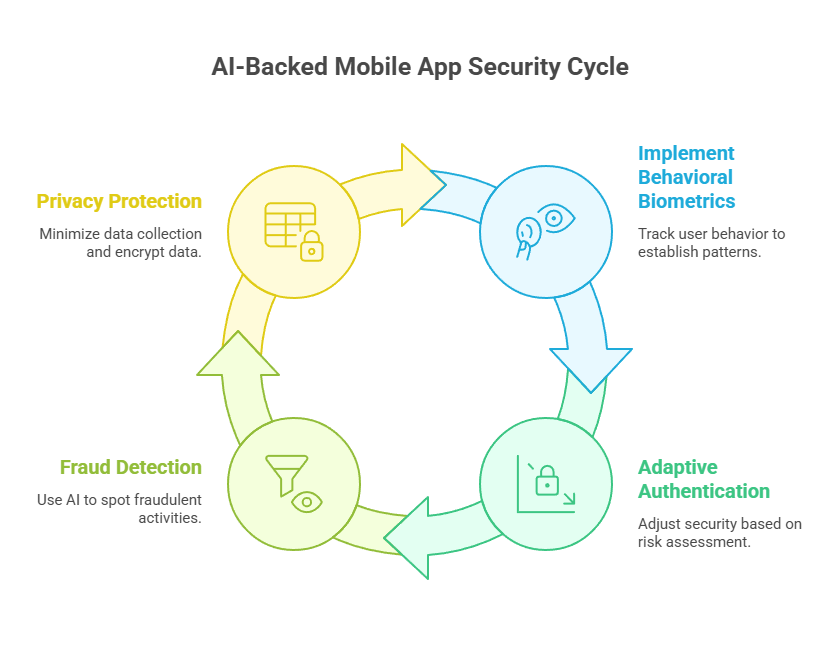
The Importance of AI Security for Mobile Apps in 2026
By 2026, due to growth in security concerns, AI-backed protections for mobile applications will become an absolute necessity. As digital threats continue to become more sophisticated, traditional security will simply not suffice in protecting user data and privacy.
AI-based security features will analyze patterns and detect anomalies, and assess potential threats before they cause harm and damage. AI systems will also adapt to new attack vectors compared to security that uses static measures in place where security is static and unable to adapt as quickly to evolving threats. For users, these features will provide comfort and protection without much friction for the end user experience.
Different Ways to Implement Advanced Security Features with FlutterFlow
FlutterFlow provides several options for implementing AI-backed security features which will protect your users and data.
Start with behavioral biometrics with non-intrusive user behavior tracking to establish normal usage patterns. This will allow your app to notice potentially suspicious activity depending on previously established patterns. Use FlutterFlow's event tracking and execution of custom functions for easier behavioral monitoring systems.
Implement adaptive authentication which will change what security needs to be provided based on risk assessment. You could use FlutterFlow's conditional logic to request more verification steps like logging in from a new device or different location. You will provide security without causing more friction for legitimate users.
When it comes to fraud detection for transactional apps, you could leverage existing services dedicated to AI security through API connections in FlutterFlow to implement your security features. Such services look at transaction trends and user behavior to spot potentially fraudulent activity before it can happen.
Privacy protection measures are also critical. Use the FlutterFlow database rules and security capabilities to incorporate data minimization principles. Approach the application design for mobile apps to collect only the data that is required, and use proper methods for anonymization and encryption of sensitive data.
7. Conclusion: Getting Your FlutterFlow App Prepared for the Future
The future of mobile applications is undeniably AI-driven. Features such as intelligent personalization, generative AI, AI agents, visual intelligence, and AI-powered security are rapidly becoming essential for creating engaging and competitive applications.
The good news is that FlutterFlow makes AI integration more accessible than ever. Through API integrations, custom actions, and backend services, developers can build sophisticated AI-powered experiences without requiring deep expertise in machine learning or data science.
However, successful AI implementation is not about adding AI for its own sake. The most effective applications use AI to solve real user problems, enhance experiences, and deliver meaningful value. Great AI feels seamless and intuitive—users benefit from it without needing to think about the technology behind it.
As AI capabilities continue to evolve, businesses and developers who adopt these technologies early will be better positioned to meet rising user expectations and stay ahead of the competition. The future of mobile apps is intelligent, and now is the perfect time to start building it with FlutterFlow.


View more blogs


.png)

.png)


.png)
.png)
.png)

Ready to develop your own product? Get in touch today!
Get in Touch
